
Grade your first piece of content
Paste any draft into the Fynch Content Studio to see how much it reads like generic AI writing and which lines to fix. No account needed.
Paste your draft into the Content Studio or select Audit URL to pull content directly from a website. In a few seconds you'll see a score and the words and phrases that make your writing sound generic. You don't need an account for your first few grades.
What you can grade
Any written content works: a blog post, LinkedIn post, newsletter, email or website page copy. It doesn't matter whether you wrote it yourself, used AI, or did a mix of both.
Steps
- Open the Content Studio.
- Select the type of content you want to grade.
- Paste your draft into the editor.
- Review your score and the highlighted words.
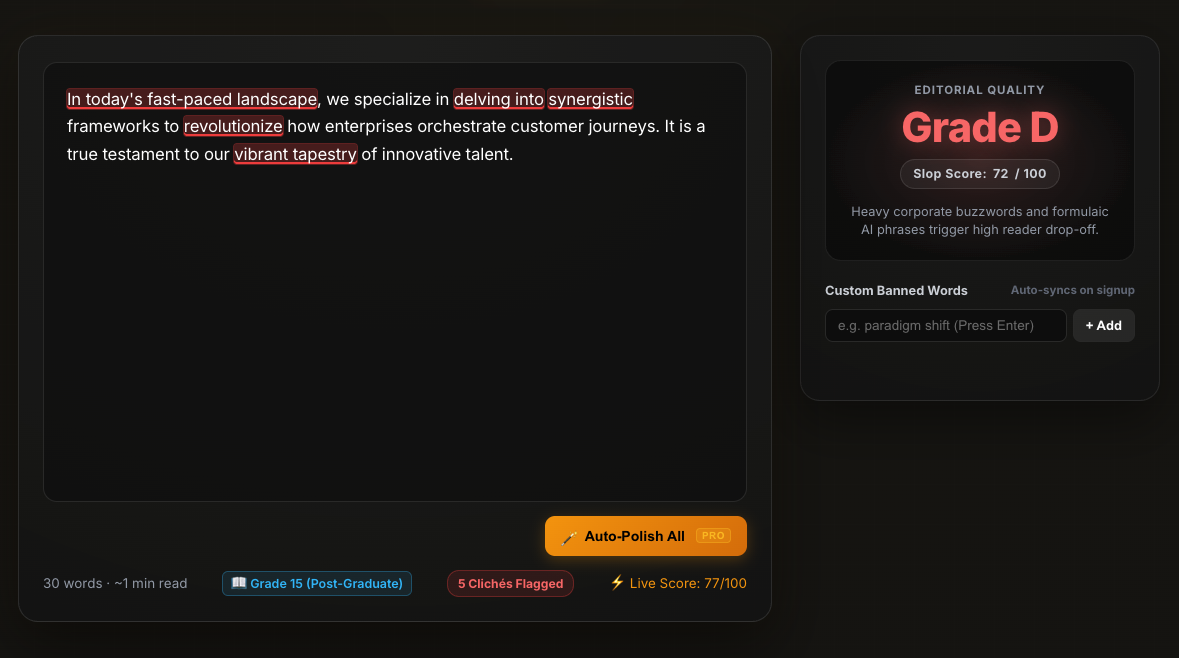
Reading your score
The grader looks at how your writing reads, not at who or what wrote it. Lower is better. A high Slop Score means a dense mix of formulaic AI buzzwords, vague claims and filler phrases. A low score means cleaner, more human-sounding copy.
Start with the highlighted words. They're usually the quickest wins.
Improving your draft
- Click a highlighted word or phrase to see 1-Click Authentic Replacements, then click a suggestion to swap it in.
- Edit anything else by hand. Swap general claims for specifics, like a number, a name, an example or a customer's words.
- Content is re-graded again as you work, so you can check that your score went down.
On a free trial or paid plan, you can also select Auto Polish All to improve the whole draft in one step.
When you run out of free grades
After a few grades, you'll be asked to start a free 14-day trial. No credit card is needed. The trial gives you more grades, plus a chat panel next to your draft for research and edits. It also unlocks Interview Me, which asks you a few questions and turns your answers into an outline and first draft.