
Run a free AI Search audit
Enter your website URL to see how ready it is to be found and cited by ChatGPT, Perplexity, Gemini and Google. Free, no account needed.
Enter your website address in the AI Search grader and select Audit Website. You'll get a free report on how ready your site is to be found and cited by AI tools like ChatGPT, Perplexity and Gemini. You don't need an account, and you can audit as many sites as you like.
Why it matters
More people now ask AI tools for recommendations instead of searching Google. If those tools can't read or trust your site, they recommend someone else. The audit shows what's getting in the way.
Steps
- Open the AI Search grader.
- Enter your website address, like
yourbusiness.com. - Select Audit website.
- Review your report.
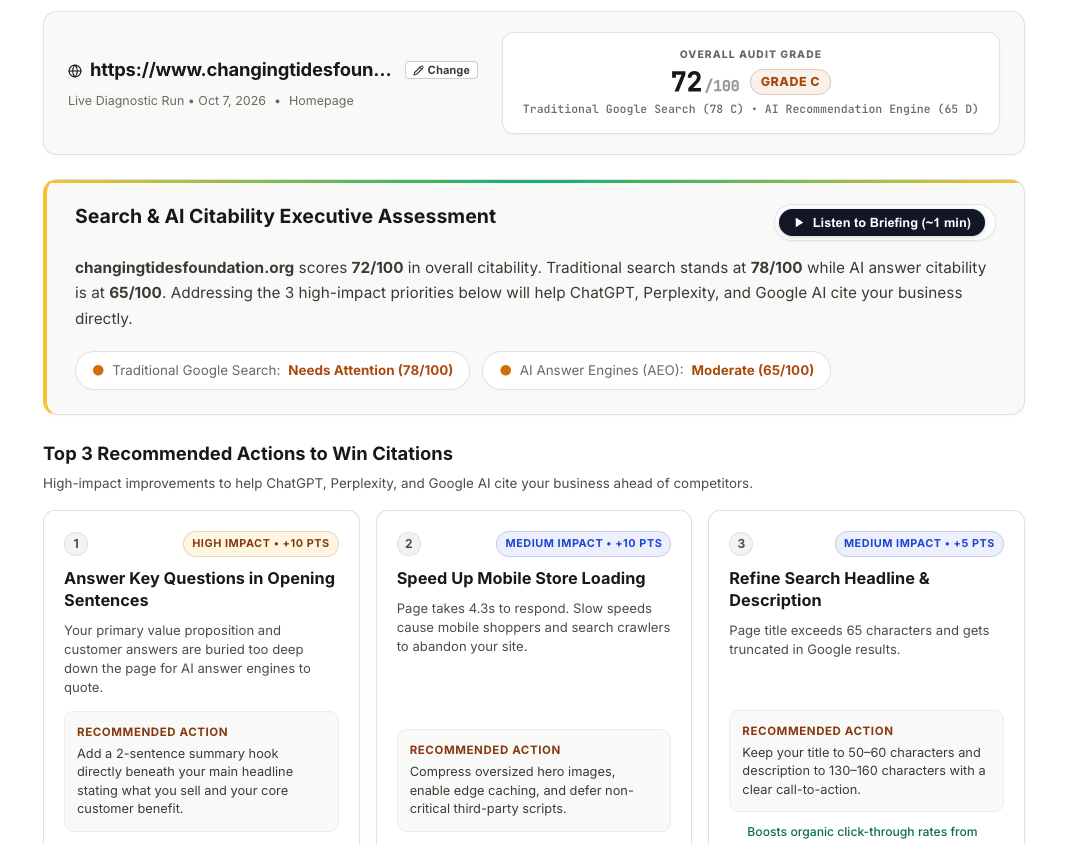
Reading your report
Your report has three parts:
- Summary: Your overall score and a short, plain-language overview. You can also listen to a 1-minute audio briefing that explains your report.
- Top 3 action items: The three changes most likely to give you a quick win.
- SEO and AEO scores: Detailed scores for traditional search (SEO) and for AI answer engines like ChatGPT (AEO), with sections that explain what's behind each score.
If you only do one thing, start with your top 3 action items. Then run the audit again to see your score change.
Fixing what the audit finds
The free report shows what to fix. A free 14-day trial (no credit card) gives you the fixes themselves:
- Ready-to-paste schema and meta tags for your pages
- Rewritten, answer-first copy that puts the key point up front
- Tracking of how ChatGPT, Perplexity and Gemini respond to questions about your business
You don't need a developer. Most fixes are copy-and-paste into your website builder. Adding fixes to your site →