
Knowledge Base: Persistent Memory
What is the Knowledge Base?
The Knowledge Base is the persistent "memory bank" for your FynchAI Workspace. It is a curated collection of digital resources (websites, blog posts, service pages, and articles) that your agent uses to understand the specific nuances of your business.
Unlike a standard search engine, the Knowledge Base allows the AI to ground every response in your actual data, ensuring that it don’t just know about your industry, but also know about your company.
Why the Knowledge Base is Critical
In a typical AI interaction, you have to provide context every time you start a new conversation. The Knowledge Base eliminates this "context tax." By referencing these stored resources, the AI can:
Maintain Strategic Alignment: Ensure every marketing plan or content draft is based on your real-world offerings and expertise.
Improve Accuracy: Reduce "hallucinations" by relying on verified information from your own website rather than general training data.
Save Time: You can simply say, "Write a post about our new service," and the AI will already have the details on that service stored and ready to use.
How Information is Added
FynchAI is designed to learn proactively, but you also have manual control over the primary sources:
1. Automatic Discovery (Agent-Led)
The AI system is constantly listening for context. Whenever you share a URL with it during a chat or via an email thread, it doesn't just look at it once. It performs a deep read of the page and automatically saves that link to your Knowledge Base. This ensures that any resource you discuss becomes a permanent part of its understanding of your brand.
2. Manual Entry (User-Led)
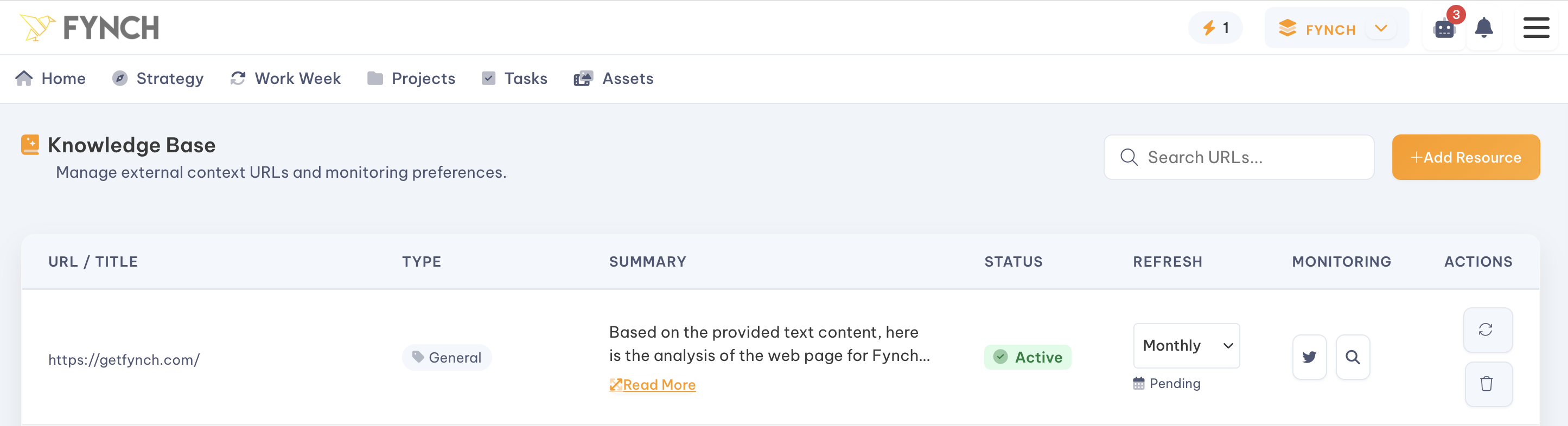
For high-priority documents (like your homepage, "About Us" section, or core product pages) you can manually add URLs.
How to do it: Navigate to the Knowledge tab in your Workspace.
The Action: Click the "Add Resource" button and paste the target URL into the "Add URL" field. Your agent will immediately crawl the page, extract the text, and index it for future use. This is the best way to ensure it has read your most important "North Star" content before you begin working together.
Individual URL Deep-Dives
The Knowledge Base is more than just a list of links; it is a diagnostic engine. When you click on a specific URL in your library, you can trigger four targeted actions to deepen the agent's understanding of your brand:
1. Crawl Linked Pages (1 Level Deep)
If a specific URL contains important sub-pages (like a services menu or a blog index), you can command the AI to crawl one level deeper. This allows it to automatically discover and index all pages directly linked from the original URL, ensuring it captures the full breadth of information on that section of your site.
2. Find & Add Social Media Profiles
Establishing your official social presence is vital for cross-channel consistency. This feature scans the website to identify linked social media profiles (LinkedIn, X, Instagram, etc.). Once found, the AI logs these profiles in your Workspace, allowing it to accurately reference them or draft platform-specific content that matches your existing footprint.
3. Run SEO & AEO Audit
You can trigger a technical audit to analyze how well the page is optimized for both traditional Search Engines (SEO) and modern AI Language Models (AEO). It will evaluate metadata, structure, and readability, providing actionable steps to improve your brand's visibility in both Google searches and AI-generated answers.
4. Auto-Extract Writing Personas
To ensure the AI writes in your exact voice, you can ask it to extract a "Writing Persona" from the domain. It analyzes the tone, vocabulary, and sentence structure of the content from the provided URL to create a reusable style guide. Once extracted, you can apply this persona to any future content task to maintain a consistent brand voice across all channels.
Managing Your Knowledge Base
A strong Knowledge Base is a clean one. You can manage your library directly within the Knowledge tab:
Reviewing Content: View a list of all indexed URLs to see exactly what the AI is referencing.
Updating Links: If you’ve recently updated a page on your website, you can ask the AI to "Re-scan" the URL to ensure it has the latest information.
Deleting Outdated Info: If a service is discontinued or a blog post is no longer relevant, you can delete the link. It will immediately "forget" that context, preventing it from influencing future drafts.