
How to Write a Blog Post
FynchAI makes it simple to overcome writer's block and generate high-quality blog posts that are tailored to your business. This article walks you through using the "Write a Blog Post" quick action (or via email) to get a great first draft in minutes.
Using the "Write a Blog Post" Quick Action
From your Workspace homescreen, you can find the "Write a Blog Post" quick action by clicking the "More" pill or typing "Blog" into the chat prompt (and selecting the filtered option "Write Blog Post"). This opens a simple form designed to capture the essential details for your article.
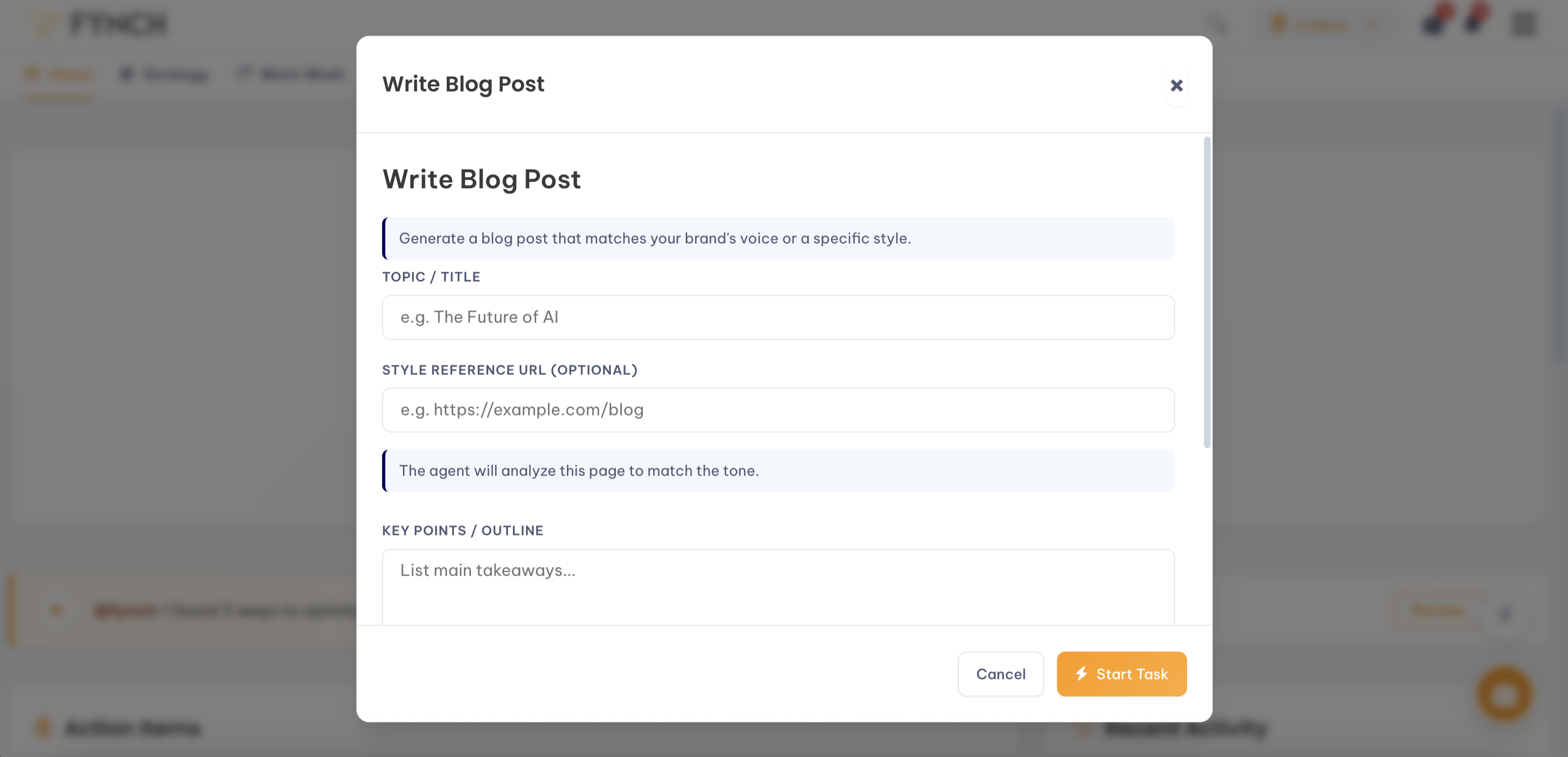
Understanding the Fields:
Topic/Title: Enter the main subject or a working title for your blog post. The more specific you are, the better.
Style Reference URL (Optional): Think of this like a mini Persona. If you already have published content (existing blog post, social post, etc.) that is a great example of the same tone/pacing/style that you want to replicate, include it here.
Key Points / Outline:
Key Talking Points: List the main ideas or specific points you want to be included in the article. You can use bullet points for this.
Target Audience: Briefly describe who you're writing for (e.g., "small business owners," "new parents," "experienced marketers").
Keywords: If you have specific SEO keywords you want to include, list them here.
Call to Action (CTA): What do you want the reader to do after reading the post? (e.g., "Sign up for our newsletter," "Book a consultation").
Alternative: Requesting via the Email Agent
You don't need to be in the Workspace to start a draft. You can also send your request directly to your agent via email. This is a great way to kick off content creation while managing your inbox.
To get a high-quality output similar to the Workspace form, use a structured prompt in your email.
Email Prompt Example:
To: [agent's name]@emailagent.ai
Subject: Blog Post Request: [Topic Name]@[agent name], please draft a blog post with these details:
Topic: 5 Ways to Prepare Your Garden for Spring
Key Points: Soil testing, pruning early perennials, starting seeds indoors, and checking tools.
Target Audience: Beginner home gardeners.
Keywords: spring gardening tips, soil preparation, seed starting.
CTA: Visit our garden center for supplies.
How FynchAI Crafts Your Blog Post
When you submit your request, your agent does more than just use the information you provided. To ensure the content is strategically aligned and sounds like you, it also automatically incorporate:
Your Brand Guidelines: The agent applies your stored brand voice, tone, and terminology to ensure the writing is authentic.
Your Business Overview: It uses its understanding of your products, services, and overall business strategy to add relevant context.
Your Knowledge Base: It reference any relevant past notes or documents to maintain consistency.
Editing the Final Output
The content your agent provides is a complete first draft, ready for your review. You can edit the text directly within the Workspace Editor, just like any other document. If you'd like to make revisions, you can simply reply with feedback (e.g., "Can you make the introduction shorter?").